

Machine-Specific: Singer/Silver
The Goal
Before attempting to knit lace, please master automatic patterning (Punchcard / Elecronics) on your machine. Being familiar with how slip, tuck and fairisle work goes a long way towards understanding lace. With lace, there are so many more variables with a separate carriage and the rules associated with lace.
When the stitch pattern is created with smart symbols and the correct machine is assigned, DAK automatically provides the machine with the correct instructions. It "separates" the symbols so the carriage behaves correctly and forms the desired lace pattern.
The lace carriage on these machines can transfer stitches AND knit the rows. The main knitting carriage is set aside while knitting lace.
When creating more complex lace patterns, the carriage settings are adjusted to "transfer only" and "transfer and knit".

To create lace, Brother machines use 2 separate carriages. The lace carriage selects needles and transfers stitches, the main carriage is then used to knit the row(s) according to the pattern.
The thing to keep in mind is the lace carriage "lives" on the left side of the needlebed. A single row of lace transfers requires 2 passes of the carriage.
One pass to transfer the stitches and one pass to return the carriage to the left side of the needlebed (to make room for the main carriage to knit).

Machine-Specific: Singer/Silver
Singer / Silver Reed: Fashion Lace and Simple Lace
Simple Lace
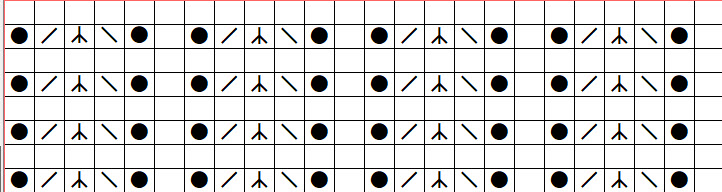
On these machines, when single stitches are transferred in the same direction per row the result is "simple" Lace
Fashion Lace
This is a Silver Reed/Studio term for use with the lace carriage.
Fashion lace is the opposite of "Simple Lace"where the single stitch transfers per row are all in the same direction.
With Fashion Lace the stitches may be transferred without knitting any stitches. When the transfers are complete, the row is knit. This allows for stitch transfers in both directions on the same row
This is controlled by the carriage settings. "P" for Fashion Lace and "L"for Simple Lace.

Machine-Specific: Singer/Silver
Interactive Knitting: Singer/Silver

While using Interactive Knitting, DAK will respond to the smart symbols you included in your stitch pattern by displaying the carriage in the Piece Overview window.

Depending on the number and direction of stitch transfers in a row, the lace carriage has 2 settings Transfer only (FashionLace) and Transfer + Knit. (Simple Lace)


For Silver/Singer machines, if lace Smart Symbols are included in the design, DAK assumes the lace carriage only be used. The white carriage indicator will not display. All knitting will be done with the Lace Carriage.

The Pink Carriage indicates "transfer only" and no stitches are knit.

The Blue carriage indicates that the lace carriage will BOTH transfer stitches and knit.
Machine-Specific: Singer/Silver
Punchcard Basics
Machine-Specific: Singer/Silver
Punchcards: Singer / Silver
The templates (punchcards/mylar) include plain rows as well as lace carriage transfer passes
Because Singer/Silver lace carriages are used for transfers, transfers+knit AND plain knitting, the punchcard can be used with interactive knitting.
Knitting can be done using a Screen Link


The original lace punchcards include indicators along the side of the card if and when you need to change the carriage setting from Simple Lace to Fashion Lace.

Machine-Specific: Singer/Silver
Silver Reed 840
For the Silver Reed SK840 with its lace carriage attached, the Interactive Knitting screen will update as each row is transferred and / or knitted.
The lace carriage for this machine cannot knit other techniques with lace. Unlike other machines, mixing textured stitch patterns on the same row with lace is not possible.


Machine-Specific: Singer/Silver
Select a lesson from the menu to get started.