

Lace Smart Symbols
The Goal
Get familiar with the Lace tool and using the symbols to create your stitch pattern
The Symbols Organizer
Hand Knitting and Hand Manipulation
Smart Symbols
Split Sequence Challenge
Hand Knitting and Hand Manipulation
Smart Symbols
Split Sequence Challenge
Brother vs Silver/Singer
Brother "rules"
Silver/Singer "rules"
Brother "rules"
Silver/Singer "rules"
Lace Smart Symbols
The Symbols Organizer
Lace Smart Symbols
Hand Knitting and Hand Manipulation
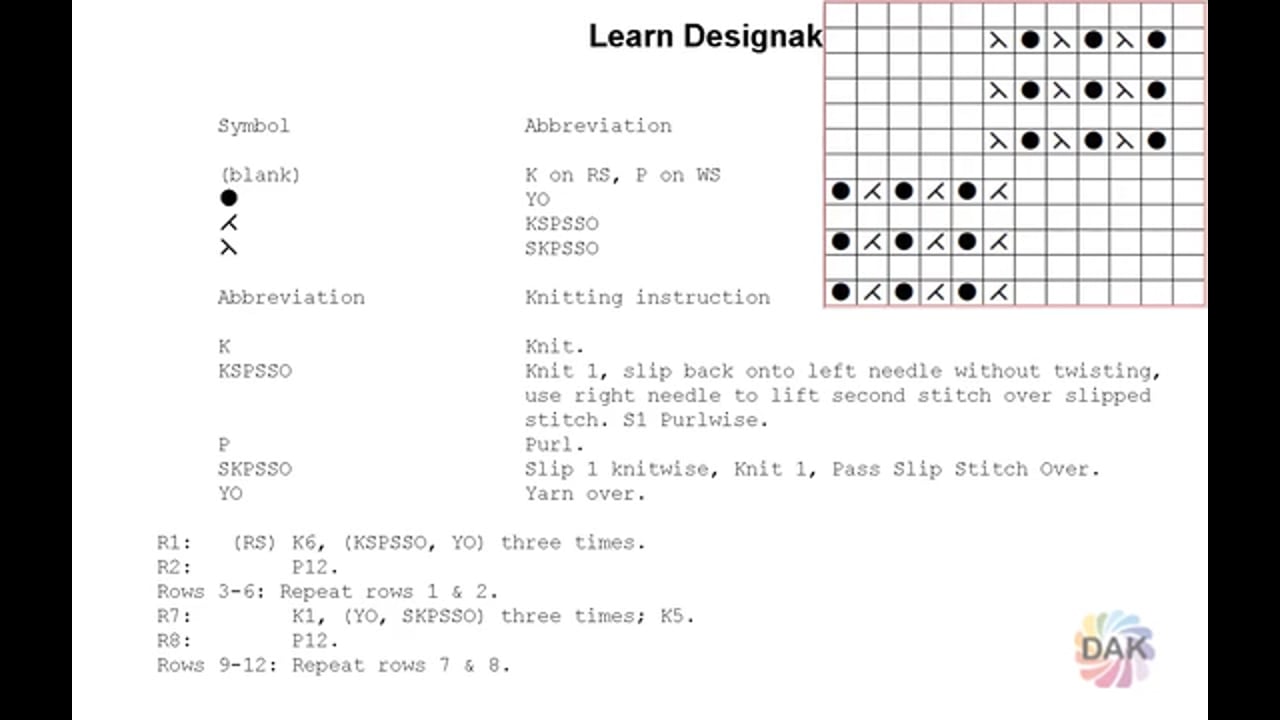
In addition to creating punchcards and downloadable files to use with knitting machines, the lace tool allows the creation of knitting charts and written instructions for hand knitting and hand manipulation.

Create knitting chart (with symbols)
- Use the Lace tool and lace symbols to create your stitch pattern
- Print your chart
-
- File
- Stitch pat(tern) symbols
Create written (text) knitting instructions
Watch the video
Lace Smart Symbols
About Smart Symbols
DesignaKnit Smart Symbols are specially designed for machine knitting. For lace, they trigger DAK to arrange the selected needles according to the type of machine you are using.
They also provide carriage instructions during Interactive Knitting.
They also provide carriage instructions during Interactive Knitting.
| Smart Symbol | Notes | Example |
|---|---|---|
 |
Eyelet (machine knitting) An eyelet is created by transferring a stitch to an adjacent needle. The emptied needle is kept in working position and when the row is knit the yarn passes over the needle, creating a "hole" or eyelet  Draw an eyelet by clicking on a stitch in gridded workspace, holding the left mouse button, drag in the direction of transfer.
 The transfers can be carried across multiple stitches (resulting in multiple passes of the lace carriage) The transfers can be carried across multiple stitches (resulting in multiple passes of the lace carriage)
|
 |
 |
Eyelet (hand knitting) The open circle is NOT a DAK smart Symbol, but is used to indicate eyelets when creating hand knitting charts. If this symbol is used, DAK will give a warning before saving or printing the stitch pattern |
 |
 |
Indicates the FINAL transferred stitch in a sequence of transfers (2 stitches on 1 needle) AND the direction of the transfer(s) | 
|
 |
Indicates any interim transfers between the eyelet and the last stitch of a transfer sequence. The lace carriage will transfer each stitch individually with multiple passes of the carriage | 
|
 |
Transfers from both directions ending on a single needle. Three stitches on one needle | 
|
 |
Used for Fine Lace on Brother machines only |  NOTE: Using the Brother Fine lace symbols with other machines will result in errors |
Lace Smart Symbols
Split sequence challenge
Lace Smart Symbols
Brother vs Silver/Singer
Both machines use the same symbols, except for one.
Different "rules" apply to how these symbols work reflecting the different methods that the lace carriages use.
The Fine Lace symbol is unique to Brother machines.
The following sections outline the "rules" DesignaKnit applies to the symbols for each type of machine.
Different "rules" apply to how these symbols work reflecting the different methods that the lace carriages use.
The Fine Lace symbol
is unique to Brother machines.The following sections outline the "rules" DesignaKnit applies to the symbols for each type of machine.
Lace Smart Symbols
Brother "Rules"
NOTE: For Interactive Knitting, Brother knitting machines require an extra magnet arm to attach to the lace carriage.
Brother " Do's"
Lace and Fine Lace can be used in the same row

Lace transfers may EITHER be on odd or even rows (depending on the starting side of the knitting) Set the starting side of the knitting with the machine setup.
> Options > Method of knitting > Setup > start swatch with COL
Transfers can be in both directions in the same row.

Adjacent Fine Lace eyelets are allowed where the transfers go in opposite directions.

Lace and Fair Isle color patterns can be used within the same row, provided that the knitting method is set to Fairisle.

Lace and textured stitch symbols (slip, tuck, etc) are allowed within the same row.
Textured stitch symbols cannot interfere with extended lace stich transfers, between eyelet and it's matching decrease

If the Fair Isle method has been selected, the transfer stitches may be drawn in a contrasting color.

Lace transfers may EITHER be on odd or even rows (depending on the starting side of the knitting) Set the starting side of the knitting with the machine setup.
> Options > Method of knitting > Setup > start swatch with COL
Transfers can be in both directions in the same row.
Adjacent Fine Lace eyelets are allowed where the transfers go in opposite directions.
Lace and Fair Isle color patterns can be used within the same row, provided that the knitting method is set to Fairisle.
Lace and textured stitch symbols (slip, tuck, etc) are allowed within the same row.
Textured stitch symbols cannot interfere with extended lace stich transfers, between eyelet and it's matching decrease
If the Fair Isle method has been selected, the transfer stitches may be drawn in a contrasting color.
Brother "Don'ts"
A lace transfer, whether Lace or Fine Lace, may not be drawn within a sequence of Lace transfers.

To ensure the carriage positions, lace tranfers may not use odd and even rows within one patttern or be on consecutive rows.

Lace eyelets may not be on adjacent needles. If it is attempted the Lace tool will delete the first eyelet in favor of the second.

Lace and Fine Lace eyelets may not be used on adjacent needles. If it is attempted the Lace tool will delete the first eyelet in favor of the second.
Eyelets may not be drawn on successive rows.
Textured stitch symbols cannot interfere with extended lace stich transfers, between eyelet and it's matching decrease

To ensure the carriage positions, lace tranfers may not use odd and even rows within one patttern or be on consecutive rows.
Lace eyelets may not be on adjacent needles. If it is attempted the Lace tool will delete the first eyelet in favor of the second.
Lace and Fine Lace eyelets may not be used on adjacent needles. If it is attempted the Lace tool will delete the first eyelet in favor of the second.
Eyelets may not be drawn on successive rows.
Textured stitch symbols cannot interfere with extended lace stich transfers, between eyelet and it's matching decrease
Lace Smart Symbols
Silver/Singer "Rules"
Silver/Singer "Do's"
Lace transfers can be on BOTH odd or even rows (as long as eyelets are not directly above each other)

Bands of fairisle or textured pattern (tuck, slip, etc) MAY be used (as long as there are no lace symbols on the same row)
Bands of fairisle or textured pattern (tuck, slip, etc) MAY be used (as long as there are no lace symbols on the same row)
Silver/Singer "Don'ts"
Eyelets may not be directly above each other

Patterning knitting (fairisle or textured) CANNOT be combined with lace on the same row

When symbols for single transfers are used that face in the opposite direction that the carriage travels, a warning will be given before saving or interactive knitting that the sequence can only be knitted as Fashion Lace

Notes for the Silver Reed 840
For the Silver Reed SK840 with its lace carriage attached, the Interactive Knitting screen will update as each row is transferred and / or knitted.
The lace carriage for this machine cannot knit other techniques. Unlike other machines, mixing textured stitch patterns on the same row with lace is not possible.


Patterning knitting (fairisle or textured) CANNOT be combined with lace on the same row
When symbols for single transfers are used that face in the opposite direction that the carriage travels, a warning will be given before saving or interactive knitting that the sequence can only be knitted as Fashion Lace
Notes for the Silver Reed 840
For the Silver Reed SK840 with its lace carriage attached, the Interactive Knitting screen will update as each row is transferred and / or knitted.
The lace carriage for this machine cannot knit other techniques. Unlike other machines, mixing textured stitch patterns on the same row with lace is not possible.
Lace Smart Symbols
Select a lesson from the menu to get started.